Web Application Deployment in Minutes
Deploying a web application during its development process can be tedious. This is true in particular for web services that need HTTPS endpoints with SSL certificates so that mobile Apple or Android devices can access them. There are a lot of examples setting up a Docker environment or publishing your services directly to a developer specific server. Still, all of these approaches are not as easy as the steps given in the video.
Video
Key facts
- Assume you have a web application which is running locally on your development server at
http://localhost:8000/FinnHubEx/index.html. This URL is inaccessible from any machine outside your network. Also, communication is unencrypted and is not secured with an SSL certificate. - (https://www.ngrok.com) is a service that can be used to quickly make your local application available on the Internet. Even better, it will be secured with a certificate.
- In the download section, you find a free version for macOS, Windows, and Linux.
- Download the ZIP file and extract it in a folder that is easily accesible using the command-line.
- Running the executable
ngrok.exeshows all options.
C:\tools>ngrok
NAME:
  ngrok - tunnel local ports to public URLs and inspect traffic

USAGE:
  ngrok [command] [flags]

DESCRIPTION:
  ngrok exposes local networked services behinds NATs and firewalls to the
  public internet over a secure tunnel. Share local websites, build/test
  webhook consumers and self-host personal services.
  Detailed help for each command is available with 'ngrok help <command>'.
  Open http://localhost:4040 for ngrok's web interface to inspect traffic.

Author:
  ngrok - <support@ngrok.com>

TERMS OF SERVICE: https://ngrok.com/tos

EXAMPLES:
  ngrok http 80                           # secure public URL for port 80 web server
  ngrok http --domain baz.ngrok.dev 8080  # port 8080 available at baz.ngrok.dev
  ngrok http foo.dev:80                   # tunnel to host:port instead of localhost
  ngrok http https://localhost            # expose a local https server
  ngrok tcp 22                            # tunnel arbitrary TCP traffic to port 22
  ngrok tls --domain=foo.com 443          # TLS traffic for foo.com to port 443
  ngrok start foo bar baz                 # start tunnels from the configuration file

COMMANDS:
  api                            use ngrok agent as an api client
  completion                     generates shell completion code for bash or zsh
  config                         update or migrate ngrok's configuration file
  credits                        prints author and licensing information
  diagnose                       diagnose connection issues
  help                           Help about any command
  http                           start an HTTP tunnel
  service                        run and control an ngrok service on a target operating system
  start                          start tunnels by name from the configuration file
  tcp                            start a TCP tunnel
  tls                            start a TLS tunnel
  tunnel                         start a tunnel for use with a tunnel-group backend
  update                         update ngrok to the latest version
  version                        print the version string

OPTIONS:
      --config strings   path to config files; they are merged if multiple
  -h, --help             help for ngrok
  -v, --version          version for ngrok
- In order to host your application running on
localhostwith thehttpprotocol, run it with the following parameters:
>> ngrok http 8000
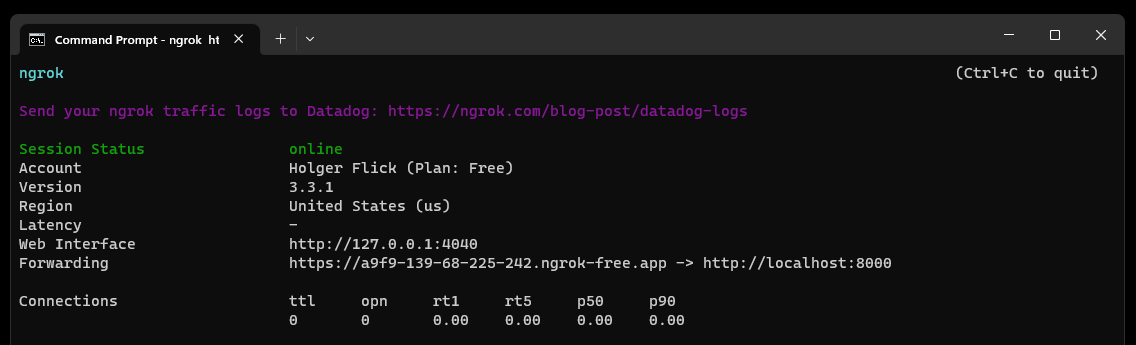
- That's it! You are now hosting your application worlwide.